
Setting your daily budget
Your daily budget is set during the Budget & Schedule step of campaign setup. Here's how it works:
1. Choose where you want to advertise
Select the billboard location(s) for your campaign, either by choosing specific signs or by defining a target area.
2. Enter your daily budget
Type in the maximum amount you want to spend each day across your entire campaign — not per individual billboard.
3. Review your estimated reach
As you adjust your budget and location selections, the impressions and Blips estimate updates in real time so you can see your projected reach before launching.

Your daily budget is spread across your entire campaign's billboard inventory — not applied per sign. A $200/day budget across multiple boards means Blip distributes that $200 in total, not $200 per location.
How much should I spend?
There's no single right answer — it depends on your goals and how billboards fit into your overall marketing mix. Here are some general guidelines:
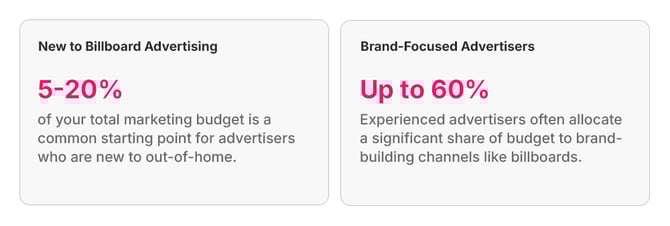
Start with a modest daily budget to gather performance data, then scale up once you've identified which locations deliver the best results for your spend.
Changing your budget after launch
You can update your daily budget at any time while your campaign is live — you're never locked in. Head to your campaign edit settings and adjust the amount up or down as needed. Changes take effect going forward and won't impact spend already delivered.